MPE/iX SCSI Pass-Through · ECHO3000 RC 1.2 & Real HP 3000 Iron
Virtual Tape Library (:TAPELIB): How to Use It & Why It Matters
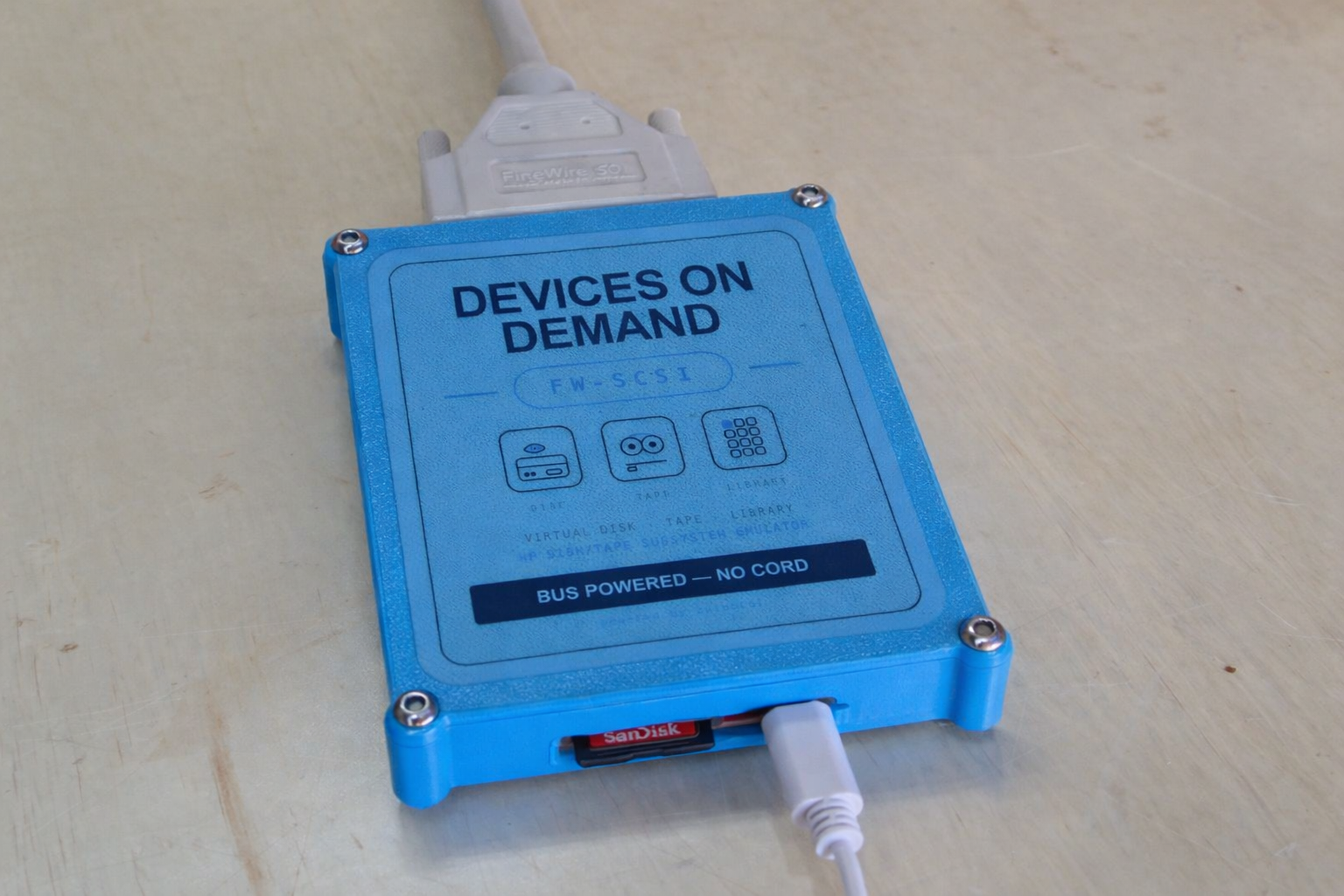
With :TAPELIB, MPE/iX speaks directly to and queries your tape library right from the colon prompt. Browse hundreds of virtual reels, mount archived backups with wildcards, create fresh cartridges for :STORE, or open a full-screen 80×24 picker — pre-installed in ECHO3000 RC 1.2 and available for real PA-RISC HP 3000 systems running EchoServ's Devices on Demand SCSI-to-SD hardware.
Why an MPE-Queryable Tape Library Changes Everything
Designed by HP 3000 system managers for daily backups, historical restores, and unattended batch operations.
:TAPELIB, MPE/iX talks directly to the library over SCSI Pass-Through, queries the reel directory by name, and mounts the exact tape you ask for.
1. Zero trips to the rack — and zero switching out of your MPE session
- On physical HP 3000 hardware (Devices on Demand): Manage remote backups, ad-hoc restores, and year-end archives over SSH, Telnet, or reflection from anywhere — without walking into the computer room to swap aging DDS/DLT cartridges or press hardware slot buttons.
- In ECHO3000 (Windows & Linux): Everything stays right at the MPE/iX colon prompt (or inside batch jobs and command files) without having to switch over to the host window.
2. Built-in safety rails that protect historical backups
- Read-only by default on existing reels: Running
:TAPELIB MOUNTloads archived cartridges with the virtual write ring out unless you explicitly addRW. - Automatic protection for system archives: Critical full-backup filenames (such as
FULLSTORE*) and archivalTAPECOPYcontainers remain write-protected automatically. - Exclusive creation on
NEW::TAPELIB NEWcreates a brand-new tape file exclusively — if a reel with that name already exists in the library, the drive refuses to overwrite it and leaves any currently loaded cartridge untouched. - Operator capability gate & 78-column display: By default, only accounts carrying System Operator (
OP) or System Manager (SM) capability can swap reels (or you can open access to all accounts on a hobbyist box with:TAPELIB ACCESS ALL). Every table, status screen, and 80×24 picker view fits cleanly inside 78 columns with zero terminal wrap.
3. One portable tape shelf shared between real HP 3000 iron and ECHO3000
Every virtual cartridge is a standard file on your Devices on Demand SD card or in ECHO3000's tapes/ folder. Copy a nightly .vtp or .std backup off your physical HP 3000's SD card, drop it into ECHO3000 on your laptop, and verify a full :RESTORE in minutes — or prepare software reels on your PC and mount them straight on your production 3000.
Commands at the Colon Prompt & 80×24 Picker
Pre-installed as a system-wide command (TAPELIB.PUB.SYS + TAPELIB.UDC.SYS) talking to LDEV 7 by default.
Everyday :TAPELIB Commands
:TAPELIB                        (launch full-screen 80x24 HP 2392A / VT100 picker)
:TAPELIB STATUS                 (show LDEV 7 path, protocol tier & loaded reel)
:TAPELIB LIST                   (list all reels in tapes/ & 1-level subfolders)
:TAPELIB LIST *2026*            (filter library listing with * and ? wildcards)
:TAPELIB MOUNT TAPELIB-PATCH*   (mount matching reel READ-ONLY by default)
:TAPELIB MOUNT scratch.vtp RW   (mount an existing scratch reel READ/WRITE)
:TAPELIB NEW bkup_nov22.vtp     (create & mount a brand-new RW reel; never clobbers)
:TAPELIB UNMOUNT                (eject / unload the current cartridge)
:TAPELIB ACCESS ALL             (allow non-OP/SM users to run :TAPELIB; OPER resets)
:TAPELIB HELP                   (concise 78-column command summary)
Multiple tape drives? Add LDEV=<n> (for example, :TAPELIB STATUS LDEV=8) to target any configured SCSI tape drive.
What :TAPELIB LIST & STATUS Look Like on MPE/iX
Every column — slot number, write-protect flag (R or W), auto-detected container format, size in KiB, timestamp, and cartridge name — formats cleanly on any 80-column HP or VT terminal:
:TAPELIB LIST

LDEV 7 (0/0/1/0.4.0) -- 3 tapes:
SLOT  ST   FORMAT    SIZE(KiB)  CREATED           CARTRIDGE
----  ---  --------  ---------  ----------------  ----------------------------
   0   W   STD             378  2026-11-22 21:31  TAPELIB-PATCH.STD
   1   W   VTP             379  2026-11-22 21:31  TAPELIB-INSTALL.VTP
   2   W   SIMH            378  2026-11-22 21:31  TAPELIB-INSTALL.TAP
Full-Screen 80×24 Interactive Picker Keys (:TAPELIB with no arguments)
Automatically detects HP terminals (Reflection, QCTerm, HP 2392A/700-92) and ANSI/VT100 terminals:
| Command | Action |
|---|---|
# or M [#|glob*] | Enter a row number (1..N) or M <pattern*> to mount that cartridge Read-Only (safe default). |
W # or W <name> | Mount row # or matching cartridge Read/Write (inserts virtual write ring if permitted). |
N [name.vtp] | Create and mount a brand-new blank cartridge exclusively (press Enter at prompt for an automatic timestamped name). |
U | Unmount / eject the currently loaded cartridge from the drive. |
/pattern* | Filter the displayed tape directory by wildcard pattern (/ alone clears the filter). |
P / B · H · Q | P / B (or + / -) pages forward/back · Enter refreshes · H toggles HP 2392A vs VT100/ANSI · Q quits to :. |
Step-by-Step MPE/iX Examples
Copy-and-paste examples for restoring files, cutting fresh :STORE backups, and using host shortcuts.
Mount an archived reel Read-Only and run :RESTORE
Wildcards let you mount long timestamped archive names in a single line without typing the full filename, and Read-Only mode guarantees nothing on the reel is altered:
:TAPELIB LIST
:TAPELIB MOUNT TAPELIB-PATCH*
:TAPELIB STATUS
:FILE T;DEV=7
:RESTORE *T;@.@;LISTDIR
:TAPELIB UNMOUNT
Create a new .vtp cartridge and run :STORE
:TAPELIB NEW creates a zero-byte file in your library directory, mounts it Read/Write at Beginning-of-Tape, and hands it straight to MPE/iX :STORE (works great inside scheduled :STREAM batch jobs, too!):
:TAPELIB NEW nightly_20261122.vtp
:FILE T;DEV=7
:STORE @.@.ALLEGRO;*T;SHOW
:TAPELIB STATUS
:TAPELIB UNMOUNT
Tip: You can organize cartridges into one level of subdirectories inside your library folder (for example, daily/mon.vtp or yearly/acct_2026.std) and mount them directly by relative path.
Complementary mpe> operator shortcuts on Windows & Linux
Running ECHO3000 on your PC? Alongside in-guest :TAPELIB, RC 1.2 upgrades the host mpe> operator prompt with Up/Down-Arrow command history (readline), shell-style * wildcard expansion, and Unix/Windows ~ / ~user home-directory + symlink resolution:
mpe> tape status
mpe> tape load TAPELIB-PATCH* ro
mpe> tape load ~/tapes/lpstdev_202*
mpe> tape new nightly_test.vtp
mpe> tape unload
Supported Tape Container Formats
Auto-detected on mount — and convertible anytime on your PC with tapeconv.py.
Which Format Should I Use?
| Format | Read / Write | Best For |
|---|---|---|
.vtp (VTP1) | Read / Write | Recommended for new backups on Devices on Demand & ECHO3000 — carries DDS setmarks, filemarks, and a persistent in-header write-protect flag. |
.std (MPE Store-to-Disc) | Read / Write | Direct interchange with MPE/iX :FILE T=...;DEV=DISC files transferred via binary FTP (CODE=2501). |
.tap (SIMH) | Read / Write | Interchange with classic HP 3000 / SIMH archives (includes exact byte-length tracking for odd-sized records). |
CHARON-A / CHARON-B | Read / Write | Mounting existing commercial emulator tape archives directly without conversion. |
TAPECOPY (tcarch) | Read-Only | Mounting historical MPE freeware TAPECOPY archive files safely with zero risk of modification. |
For Real HP 3000 Iron & ECHO3000
Equip your physical PA-RISC HP 3000 with Devices on Demand + :TAPELIB, or try it right now in ECHO3000 RC 1.2.
Bring an MPE-Queryable Tape Library to Your Real HP 3000
Running a physical Series 900, A-Class, or N-Class HP 3000? Pair EchoServ's bus-powered Devices on Demand SCSI-to-SD hardware with our native :TAPELIB MPE/iX package so MPE speaks directly to and queries your SD-card tape library:
- Broad PA-RISC & MPE/iX support: Works across MPE/iX 6.5, 7.0, and 7.5 on PA-RISC 1.1 and 2.0 systems (HP-PB, NIO, and PCI SCSI adapters) with zero dependency on unreleased HP patches.
- Turnkey or upgrade: Order a pre-configured Devices on Demand SCSI-to-SD unit with
:TAPELIBready to plug into your SCSI bus, or ask us about adding:TAPELIBto your existing Devices on Demand unit.
Try :TAPELIB Today Inside ECHO3000 RC 1.2 (Pre-Installed)
Every Windows and Linux Full kit of ECHO3000 RC 1.2 ships with :TAPELIB pre-installed in PUB.SYS, [SCSI4] ImgDir = tapes configured out of the box, and sample .vtp, .std, and .tap cartridges ready to mount at the colon prompt: